

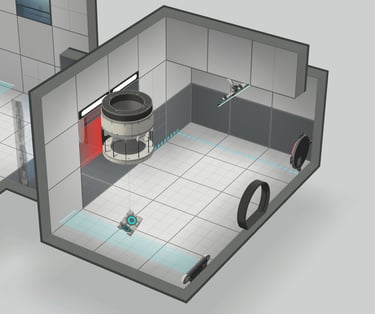
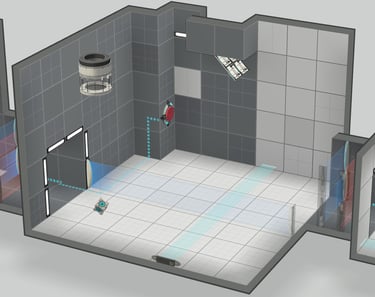
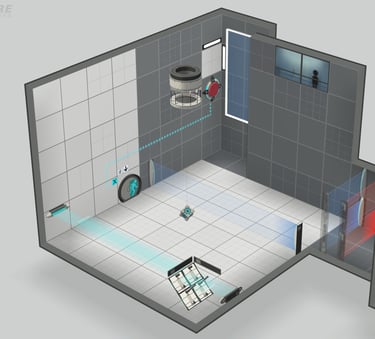
In this custom level created with the Portal 2 Workshop, complete the 3 small rooms by using the cubes sliding down the sloped light bridge.
Genre: Puzzle Game.
Engine: Portal 2 Workshop
Team size: 1
Duration: 1 week
Date: june 2026




Context
The goal of this exercise was to create a complete level in Portal 2 using its Workshop editor. I wanted to create a 3 step puzzle, with a smooth learning progression with always the same core mechanic.


My roles
I was the sole Level Designer on this level, handling everything from the brainstorming to the final publication on Steam. This project allowed me to focus heavily on Puzzle Design, using several different design methods.
Level Design
Overview



Level Flowchart
1) Tutoriel
2) Development
3) Twist
Level Design Techniques


Big Mushroom Vista:
1) The vista catches the player's attention. The giant mushroom also serves as a landmark that is constantly visible on screen. It foreshadows a futur location.
2) A forest of mushrooms foreshadows the futur location.
3) I decided to place the vista on a cliff to make the scene feel more dramatic, and to allow the player to see part of the village, which is a non-playable area.
4) On the right, the path continues, blocked by the small mushrooms. It is a small jumping tutorial, which will be useful in the next platforming section.
5) Part of the upcoming platforming section can be seen.

Watchtower Run:
1) A watchtower with an archer enemy who cannot be killed. The fire makes the watchtower directly noticeable.
2) The light from the fire casts shadows from the mushroom head, indicating the safe zones to take cover. However, it is not actually the fire that creates shadows, but a unique light source attached to each mushroom, accurately matching the archer's field of view.
3) Arrow models are placed on the ground, indicating the archer presence and surrounding the shadow safe zones that are not hit by the arrows.
4) The poisonous mushroom gas prevents the player from exploiting the archer's blind spots.
5) The fence at the beginning of the arena allows the player to safely see the entire section.


Foreshadowing Enemies:
1) Introduction to the swordsman enemy behind a fence. They do not detect the player. This allows the player to visualize the enemy before encountering them in combat.
2) In the corridor there is a fence that allows to see the enemies standing before engage the fight. The player cannot shoot them through the fence and must go down.
3) An archer enemy is behind the fence and continuously shoots at the player, but the fence blocks the arrows. This allows the player to understand the archer enemy before encountering them in a combat.
4) Before entering the arena, the fence shows the player the location and number of enemies.


Player Guidance:
In order to guide and influence the player's attention at required moments, I used several techniques:
Paths with 90° turns force the player to look toward. This allows me to influence the player's horizontal field of view.
Slopes and downward paths force the player to look more up or down. This allows me to influence the player's vertical field of view.
Lights attract the player's attention and help guide them.
Walkthrough